
斐讯 K3 路由器官方root固件运行 Debian Jessie
为什么要在路由器里运行 Debian?在 Entware-ng 的支持下,路由器可以运行更多的程序,可还是有些程序运行不了。
使用 chroot 运行 Debian Jessie,可以编译和安装任何软件,比如编译安装 Home Assistant 依赖的 Python 3.6。我在斐讯 K3 中运行了 Home Assistant、PostgreSQL、Resilio Sync 等。
准备工作
1、本文中的斐讯 K3 路由器是恩山论坛 tianbaoha 的官方 root 固件。
2、准备 U 盘或者移动硬盘,为了减少不必要的麻烦,建议格式化到 EXT4 格式,插入 USB。实测 FAT32 不行,EXFAT 不支持,NTFS 不要用在 U 盘,会有驱动问题。
开始安装 Debian 到斐讯 K3
1、先安装 Entware-ng 和 coreutils-chroot:
opkg install coreutils-chroot2、下载 Debian Jessie,用 SFTP、SMB 共享等方法放在 USB 设备中
链接: https://pan.baidu.com/s/1mhWHnYw 密码: j5jt
解压缩
cd /tmp/share/sda1
tar -xvzf debian_jessie8.9-armel_clean.tgz3、编辑启动文件 vi /opt/etc/init.d/S99debian
粘贴以下内容,注意 USB 设备的路径
#!/bin/shPATH=/opt/bin:/opt/sbin:/sbin:/bin:/usr/sbin:/usr/bin# Folder with Debian JessieCHROOT_DIR=/tmp/share/sda1/debian# Some folder outside of sandbox,# will be mounted to /mnt folder in Debian# Uncommented next line if you need to mount a folder inside debianEXT_DIR=/tmp/share/sda1CHROOT_SERVICES_LIST=/opt/etc/chroot-services.listif [ ! -e "$CHROOT_SERVICES_LIST" ]; then echo "Please, define Debian services to start in$CHROOT_SERVICES_LIST first!" echo "One service per line. Hint: this is a script names fromDebian's /etc/init.d/" exit 1fiMountedDirCount="$(mount | grep $CHROOT_DIR | wc -l)"start() { if [ $MountedDirCount -gt 0 ]; then echo "Chroot'ed services seems to be already started,exiting..." exit 1 fi echo "Starting chroot'ed Debian services..." for dir in dev proc sys; do mount -o bind /$dir $CHROOT_DIR/$dir done [ -z "$EXT_DIR" ] || mount -o bind $EXT_DIR $CHROOT_DIR/mnt for item in $(cat $CHROOT_SERVICES_LIST); do chroot $CHROOT_DIR /etc/init.d/$item start done }stop() { if [ $MountedDirCount -eq 0 ]; then echo "Chroot'ed services seems to be already stopped,exiting..." exit 1 fi echo "Stopping chroot'ed Debian services..." for item in $(cat $CHROOT_SERVICES_LIST); do chroot $CHROOT_DIR /etc/init.d/$item stop sleep 2 done mount | grep $CHROOT_DIR | awk '{print $3}' | xargs umount -l }restart() { if [ $MountedDirCount -eq 0 ]; then echo "Chroot'ed services seems to be already stopped" start else echo "Stopping chroot'ed Debian services..." for item in $(cat $CHROOT_SERVICES_LIST); do chroot $CHROOT_DIR /etc/init.d/$item stop sleep 2 done mount | grep $CHROOT_DIR | awk '{print $3}' | xargs umount -l echo "Restarting chroot'ed Debian services..." for dir in dev proc sys; do mount -o bind /$dir $CHROOT_DIR/$dir done [ -z "$EXT_DIR" ] || mount -o bind $EXT_DIR $CHROOT_DIR/mnt for item in $(cat $CHROOT_SERVICES_LIST); do chroot $CHROOT_DIR /etc/init.d/$item start done fi }enter() { [ -z "$EXT_DIR" ] || mount -o bind $EXT_DIR $CHROOT_DIR/mnt mount -o bind /dev/ $CHROOT_DIR/dev/ mount -o bind /dev/pts $CHROOT_DIR/dev/pts mount -o bind /proc/ $CHROOT_DIR/proc/ mount -o bind /sys/ $CHROOT_DIR/sys/ chroot $CHROOT_DIR /bin/bash }status() { if [ $MountedDirCount -gt 0 ]; then echo "Chroot'ed services running..." else echo "Chroot'ed services not running!" fi }case "$1" in start) start ;; stop) stop ;; restart) restart ;; enter) enter ;; status) status ;; *) echo "Usage: (start|stop|restart|enter|status)" exit 1 ;;esacecho Done.exit 0修改为可执行权限:chmod 755 /opt/etc/init.d/S99debian
4、创建 chroot services 清单文件:touch /opt/etc/chroot-services.list
需要运行的 Debian 程序(/etc/init.d/ 目录)放在这个文件中,每行一个,比如 resilio-sync
5、创建符号链接(可选):ln -s /opt/etc/init.d/S99debian /opt/bin/debian
每次进入、启动、重启、停止 Debian 要输入 “/opt/etc/init.d/S99debian start/stop”,现在只需要输入
debian start
debian stop
debian restart
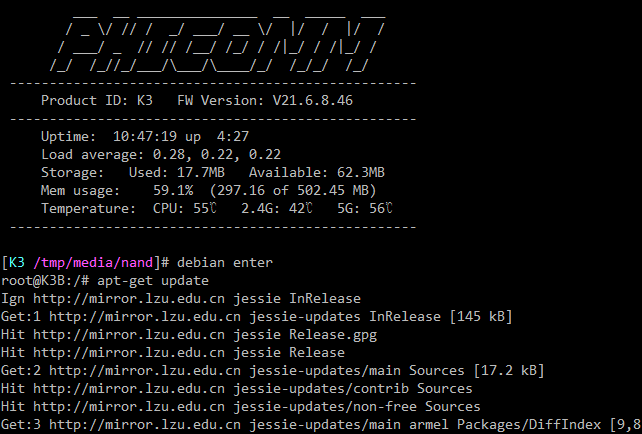
debian enter
debian status
6、Debian 的使用
#进入debiandebian enter#更新源apt-get update#安装应用,比如wgetapt-get install wget这是一个尽可能精简的 Debian 纯净版,需要安装的软件包非常多,这里就不多说了。
理论上可以用这个方法在其他 arm 设备中运行 Debian,如基于 OpenWRT 的迅雷赚钱宝。