326 字2 分钟
WindsPhoto for Z-Blog 2 升级指南
WindsPhoto for Z-Blog 2 将不再使用独立数据库进行数据存储,升级后原独立数据库将整合至 ZB2.0 数据库。
升级步骤
-
全新安装 WindsPhoto,保持 Z-Blog 2 的 WindsPhoto 为空
-
将 ZB1.8 WindsPhoto 插件目录下的 data 目录上传或转移至 ZB2.0 的 WindsPhoto 插件目录下
plugin/windsphoto/data/ - zb_users/plugin/windsphoto/data/
- 将 ZB1.8 WindsPhoto 插件目录下的 photofile 目录上传或转移至 ZB2.0 的 WindsPhoto 插件目录下
plugin/windsphoto/photofile/ - zb_users/plugin/windsphoto/photofile/
-
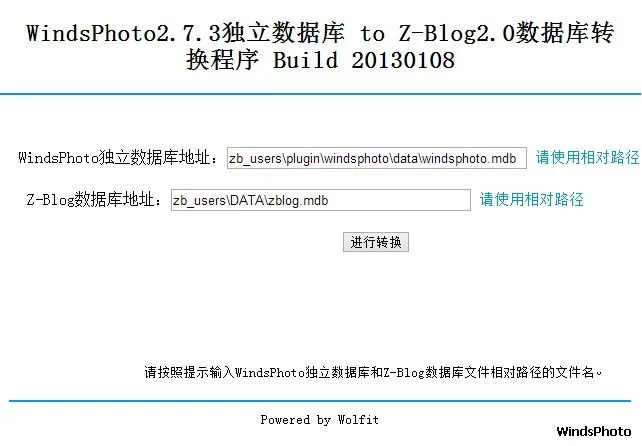
上传数据库转换脚本 WP2Zblog.asp 到 ZB2.0 根目录,运行http://你的网站/WP2Zblog.asp进入数据库转移程序,根据提示填写WindsPhoto2.7.3独立数据库文件名和ZB2.0数据库文件名,执行升级程序。
-
删除 zb_users/plugin/windsphoto/data/目录,删除 WP2Zblog.asp
PS:2013 年 1 月 16 日更新,新增自动替换 Z-Blog 文章中引用的 WindsPhoto 图片路径。
2013 年 2 月 7 日更新,根据 WindsPhoto3.0 的变化进行修正。
2013 年 2 月 25 更新,去除数据库名称检查,增强兼容性。